

 Edit This Page
This tutorial shows how to publish a gem to a Repsy Open Source Ruby repository with gem push and install it with gem install: how to build a gem, where the key goes, what Repsy checks on a push, how to install from a private repository and what each failure looks like. It complements Publishing a Ruby Gem and Installing a Ruby Gem, which show the same in short. To install with Bundler, see Using Repsy with Bundler.
Prerequisites
- A Ruby repository on your Repsy Open Source instance, see Creating a Private Ruby Registry. The address of the repository is
https://<your-repsy-host>/<repo-name>. There is no username in the address, andhttps://<your-repsy-host>stands for the address of the package protocol port of your instance, for examplehttp://localhost:9090for a local start. - A credential that may publish: your username and password, or a deploy token with the Read/Write access type. A Read Only token is enough to install, and the username can be any non-empty value.
- Ruby with RubyGems installed. The examples were tried with Ruby 4.0.
Copy the Commands from the Web UI
Open the repository in the web UI and click Configure. The dialog shows the Gemfile source, the credentials setup, the push command and the yank command, with the address of the repository filled in.
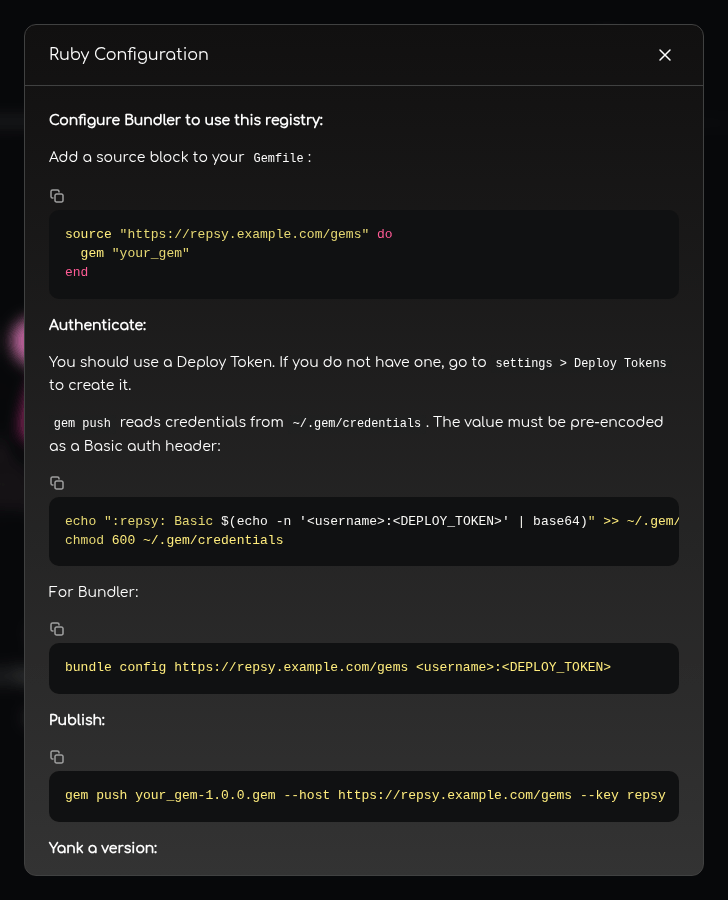
<username> and <DEPLOY_TOKEN> with your values.The rest of this page explains each command, and where the dialog leaves something out.
Build a Gem
A gem is described by a gemspec. This one is the least that gem build accepts without an error, and it does not need Git:
mkdir -p my_gem/lib && cd my_gem
# my_gem.gemspec
Gem::Specification.new do |spec|
  spec.name    = "my_gem"
  spec.version = "1.0.0"
  spec.authors = ["Your Name"]
  spec.summary = "A sample gem published to Repsy."
  spec.files   = Dir["lib/**/*"]
end
# lib/my_gem.rb
module MyGem
  def self.hello = "Hello from my_gem"
end
gem build my_gem.gemspec
gem build prints a few warnings about the missing homepage, license and Ruby version, which you can ignore for a test, and leaves my_gem-1.0.0.gem in the current directory.
If you start from bundle gem my_gem, the gemspec it generates has a line spec.metadata["allowed_push_host"] with a placeholder value. gem push refuses to push to any address other than the one in that line:
ERROR: "http://localhost:9090/ruby" is not allowed by the gemspec, which only allows "https://example.com"
Set the line to the address of your repository, or remove it.
Repsy reads the name, the version, the platform, the dependencies and the Ruby requirement from the metadata inside the .gem file, and not from its file name. The name may have up to 255 characters, and the version and the platform up to 64. Repsy does not check the form of a version, so it accepts pre-release versions such as 1.0.0.pre1. A gem that is built for a platform other than ruby has the platform in the file name of the .gem file, for example my_gem-1.0.0-java.gem.
Store the Key
gem push sends a key with the request, and Repsy takes the credential from it. RubyGems reads keys from ~/.gem/credentials, a YAML file with one line for each named key. The value is sent as the Authorization header as it stands, so there are three spellings that work:
| Value of the key | For |
|---|---|
Basic <base64 of username:password-or-token> | A user account or a deploy token. This is what the web UI shows. |
| The deploy token itself | A deploy token. The shortest form. |
Bearer <deploy token> | A deploy token. |
A user password on its own, without Basic and the encoding, is refused.
Create the file, with a name of your choice for the key. The examples use repsy:
mkdir -p ~/.gem
echo ":repsy: Basic $(echo -n '<username>:<password-or-token>' | base64 -w0)" >> ~/.gem/credentials
chmod 0600 ~/.gem/credentials
base64 -w0 keeps the value on one line (on macOS, use base64 without -w0). echo -n leaves out the newline that would change the encoding. The file has to be readable only by you: RubyGems refuses to use it otherwise and says has file permissions of 0644 but 0600 is required.
With a deploy token, this is the shortest form of the same file:
---
:repsy: <deploy-token>
Two more ways hand the key to gem push without a file. --key is then not needed:
- The environment variable
GEM_HOST_API_KEYholds the value of the key, for example in a CI job, see Using Ruby in CI. - The key with the name
:rubygems_api_key:is the one thatgem pushuses when you give no--key. It is also the key thatgem pushsends to rubygems.org, so do not use that name for Repsy unless you mean to.
Repsy does not read credentials from the address. gem push --host https://<username>:<password-or-token>@... does not work: RubyGems ignores the credentials in the address, finds no key and asks you to sign in. There is no sign-in and no sign-up on Repsy Open Source either, so gem signin cannot create the key: you store it yourself.
Push the Gem
Give gem push the address of the repository with --host, and the name of the key with --key:
gem push my_gem-1.0.0.gem \
  --host https://<your-repsy-host>/<repo-name> \
  --key repsy
Pushing gem to https://<your-repsy-host>/<repo-name>...
Successfully registered gem: my_gem (1.0.0)
The gem is in the repository now: open it in the web UI, where the list of gems and the versions of each gem show it. gem push works over plain HTTP too, which is fine for a local start. Serve a shared instance over HTTPS, because the key crosses the network with every request.
What Repsy Checks on a Push
A refused push changes nothing in the repository, and gem push exits with a non-zero status. It prints the answer of Repsy, a JSON document, as the error:
| Answer | Cause |
|---|---|
401, unAuthorized: The user has logged in but has no permissions. | The key is not accepted: a wrong password, an unknown user, a value that is a bare password, or a deploy token that is expired, revoked, Read Only or belongs to another repository. Repsy gives the same answer for all of them, so the text is misleading: check the credential first. |
404, unknownPath | There is no Ruby repository with that name at that address: the name is misspelled, the repository is of another type, or --host is the address of the instance without the name of the repository. |
409, gemVersionAlreadyExists: Gem version already exists. | The version exists and Package Override of the repository is on Deny, or the version was yanked. See Pushing a Version Again. |
400, invalidGemFile: Invalid gem file. | The file is not a gem, or its metadata.gz is missing or is not a valid gemspec. |
400, gemMetadataTooLarge | The metadata.gz in the gem is larger than 10 MiB. |
400, gemNameTooLong, gemVersionTooLong, gemPlatformTooLong, gemRequiredRubyVersionTooLong, gemDependencyNameTooLong, gemDependencyRequirementsTooLong | A value of the gemspec is over the limit: 255 characters for a name, 64 for a version, a platform and a Ruby requirement, 255 for the name and for the requirements of a dependency. |
413, payloadTooLarge: The uploaded content is too large. | The gem is larger than 500 MB. An administrator can change the limit with RUBY_MAX_GEM_SIZE, see the Configuration Reference. |
Without a usable key, gem push does not even try: it asks you to sign in (Enter your ... credentials. Don't have an account yet?), which cannot work on Repsy, and ends with unknownPath when you answer. No such API key means that the name after --key is not in ~/.gem/credentials.
Pushing a Version Again
Whether you can push a version that already exists is decided by the Package Override setting of the repository. An administrator changes it in the repository settings: open Settings of the repository and switch Package Override between Allow and Deny. The change applies at once.
| Setting | Behaviour |
|---|---|
| Allow (the default of a new repository) | The version is replaced with the new gem, and its checksum in the index changes. |
| Deny | The push is refused with 409, gemVersionAlreadyExists. Nothing changes. |
A version that was yanked is always refused, also with Allow: yanking is meant to keep the version number out of use, see Yanking Gems. A version that an administrator has deleted in the web UI is gone, so you can push it again.
Publish a new version instead of replacing an old one whenever you can: a client that has already installed or cached a version does not know that it changed.
Install a Gem
gem install takes the address of the repository with --source. A public repository needs nothing else:
gem install my_gem --source https://<your-repsy-host>/<repo-name>
For a private repository, put the credentials into the address. The username can be any value with a deploy token, and a Read Only token is enough:
gem install my_gem \
  --source https://<username>:<password-or-token>@<your-repsy-host>/<repo-name>
Use http:// where your instance serves plain HTTP, and percent-encode characters that have a meaning in a URL, such as @, : and /, in the username and the password. Anyone who can see your shell history or the process list sees the secret. RubyGems hides the password in the messages of gem install (http://<username>:REDACTED@...), but gem sources --add prints the address as you typed it.
gem install searches every source that is configured, and --source adds one to them. By default rubygems.org is one of them, so a gem of the same name that is also on rubygems.org can be installed from there instead of from your repository. Add --clear-sources to search only your repository:
gem install my_gem --clear-sources \
  --source https://<username>:<password-or-token>@<your-repsy-host>/<repo-name>
Then the dependencies of the gem have to be in the repository too. If they are on rubygems.org, use Bundler, which can take some gems from Repsy and the others from rubygems.org, see Using Repsy with Bundler.
The other read commands work the same way with --source: gem list --remote my_gem lists the newest version, gem list --remote --all my_gem all versions, and gem fetch my_gem -v 1.0.0 downloads the .gem file. A yanked version is in none of them.
To avoid repeating the address, add it to your sources, and Repsy is then searched by every gem command:
gem sources --add https://<username>:<password-or-token>@<your-repsy-host>/<repo-name>
gem sources --list
The credentials are then stored in plain text in your gem configuration file, for example ~/.config/gem/gemrc. gem sources --remove <address> removes the source again. gem sources --add fetches the index of the repository first and refuses an address that answers with an error, such as 401.
Run gem install from a directory that does not contain a .gem file of the gem: RubyGems installs a .gem file from the current directory in preference to the repository.
Troubleshooting
| What you see | Cause |
|---|---|
Unable to download data from ... bad response 401 (.../specs.4.8.gz) and Could not find a valid gem ... here is why | The repository is private and the credentials in the source are missing or wrong, or the deploy token is expired, revoked or belongs to another repository. |
Could not find a valid gem 'my_gem' (= 1.0.0) in any repository | The gem or the version is not in that repository, or the version was yanked. Check the address of the repository, and the versions in the web UI. |
has file permissions of 0644 but 0600 is required | Run chmod 0600 ~/.gem/credentials. |
is not allowed by the gemspec, which only allows ... | The allowed_push_host of the gemspec is not the address you push to. Change or remove it, and build the gem again. |
gem install installs a gem from rubygems.org | The gem exists there under the same name, and rubygems.org is one of your sources. Use --clear-sources. |
gem install installs a version that needs a newer Ruby than yours | Repsy stores the required_ruby_version of a gem, but it does not put it into the index or into the metadata that it serves to gem, so the client cannot skip a version that does not fit your Ruby. Install the version you want with -v <version>. |
A 429 answer | Too many requests with wrong credentials came from your address, see Authenticating from CI. |

