

 Edit This Page
This tutorial shows how to install Go modules from a Repsy Open Source Go repository with the go command: the GOPROXY, the credentials, the checksum database, how to use your modules next to public ones, HTTPS for a private repository and what to do when a download fails. It complements Installing a Go Module from Registry, which shows the same in short.
The go command downloads modules through a module proxy, and a Go repository is one. It answers the requests of the go command for the list of versions of a module (/@v/list), its newest version (/@latest) and the .info, .mod and .zip file of a version. It serves the modules that you uploaded and nothing else: it does not fetch modules from other proxies, and it is no checksum database.
Prerequisites
- A Go repository on your Repsy Open Source instance with a module in it, see Creating a Private Go Module Registry and Publishing a Go Module with curl.
- The address of the repository,
https://<your-repsy-host>/<repo-name>. There is no username in the address, andhttps://<your-repsy-host>stands for the address of the package protocol port of your instance, for examplehttp://localhost:9090for a local start. - For a private repository, a credential: your username and password, or a deploy token. A Read Only token is enough to install, and the username can be any non-empty value. A public repository can be read without credentials.
- For a private repository, an
https://address, see HTTPS for Private Repositories.
GOPROXY address. The steps below keep them in a .netrc file instead.Point GOPROXY at the repository
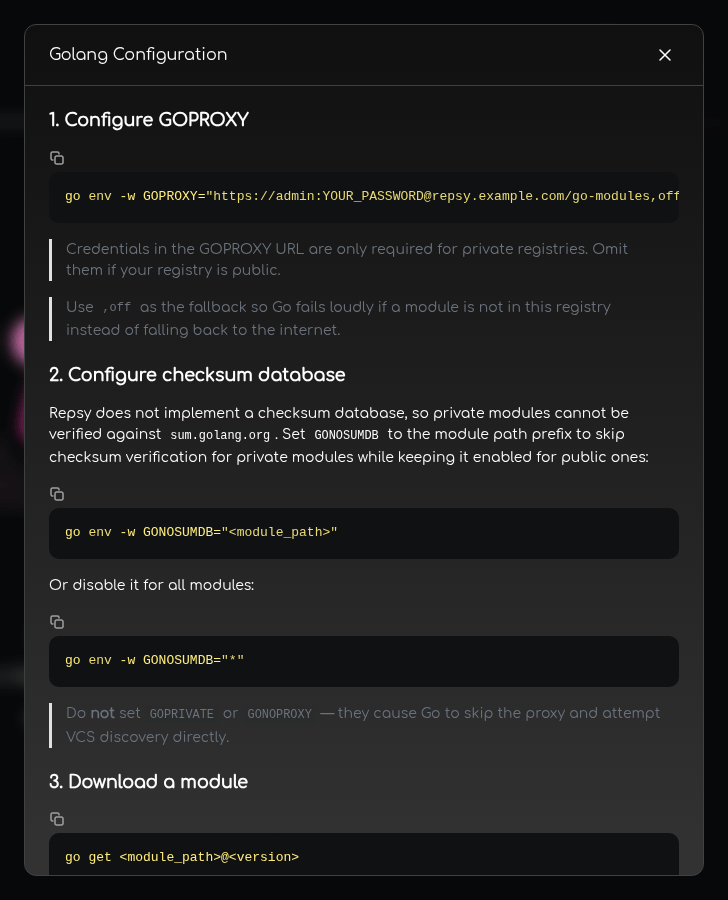
The go command reads the address of its proxy from the environment variable GOPROXY:
export GOPROXY=https://<your-repsy-host>/<repo-name>,off
To keep it for every session, add the line to your shell profile, or store it in the configuration of the go command:
go env -w GOPROXY=https://<your-repsy-host>/<repo-name>,off
The ,off at the end tells go to stop when the repository does not have a module, instead of looking for it anywhere else. A module that Repsy does not have is then reported as module lookup disabled by GOPROXY=off. See Using Your Modules Next to Public Ones for the other choices.
Give the go command your credentials
A private repository needs credentials. The go command reads them from the .netrc file in your home directory (on Windows, _netrc in your user profile), and sends them to a proxy over HTTPS:
machine <your-repsy-host>
login <username>
password <password-or-token>
Put a deploy token in password. The file holds a secret in plain text, so on Linux and macOS restrict it to your user with chmod 600 ~/.netrc.
The machine value is matched against the host and the port of the GOPROXY address. For an address such as https://localhost:9443/<repo-name>, write machine localhost:9443. An entry without the port does not match, and Repsy answers 401. To keep the file somewhere else, point the environment variable NETRC at it.
You can also put the credentials into the address: GOPROXY=https://<username>:<password-or-token>@<your-repsy-host>/<repo-name>,off. Then everybody who can read your environment, your shell history or the output of go env sees the secret, and the characters @, :, / and # in it have to be percent-encoded. Use .netrc for anything that lasts.
Skip the checksum database for your modules
The go command checks every module it downloads against the public checksum database, sum.golang.org, which knows nothing about your modules. Without more setup, the download of your module fails:
go: example.com/[email protected]: verifying module: example.com/[email protected]: reading https://sum.golang.org/lookup/example.com/[email protected]: 404 Not Found
	server response: not found: example.com/[email protected]: unrecognized import path "example.com/hello": ...
Repsy is no checksum database, so name your module paths in GONOSUMDB. It takes a comma separated list of module path prefixes:
export GONOSUMDB=example.com
The prefix example.com covers example.com/hello and every other module below it. The public modules stay verified. The go command still records the checksum of each module in your go.sum file, and it refuses a file that no longer matches, see Versions Cannot Be Overwritten. Commit go.sum with your project.
Install the module
In a project with a go.mod, ask for a version of the module:
go get example.com/[email protected]
or for the latest release:
go get example.com/hello@latest
go get downloads the module from the repository and adds it to go.mod and go.sum. Then import it and build as usual. go mod tidy and go build fetch the modules that your code imports.
@latest means the highest release version: a pre-release such as v1.3.0-beta.1 is only chosen when there is no release, and you can ask for it by name.
To see what the go command got, and the checksums it recorded in go.sum:
go mod download -json example.com/[email protected]
Check the result
go list -m -versions asks the repository for the versions of a module:
go list -m -versions example.com/hello
example.com/hello v1.0.0 v1.1.0
Using Your Modules Next to Public Ones
A Go repository does not fetch anything from other proxies. What go does with a module that the repository does not have depends on the rest of the GOPROXY list:
GOPROXY | What happens to a module that is not in the repository |
|---|---|
https://<your-repsy-host>/<repo-name>,off | It is not found: module lookup disabled by GOPROXY=off, for a version that you named and in a build; @latest ends with no matching versions for query "latest", see below. Use it when everything your project needs is in the repository, or when the build has to run without a network. |
https://<your-repsy-host>/<repo-name>,https://proxy.golang.org,direct | go asks the public proxy, and then the source of the module. |
https://<your-repsy-host>/<repo-name>|https://proxy.golang.org,direct | The same as the line above, and go also goes on after any other answer of the repository, such as an empty list of versions or a 401. See below. |
https://<your-repsy-host>/<repo-name>,direct | go fetches it from the source of the module, for example from its Git host. |
The go command goes on to the next entry of a list separated by commas when the answer is “not found” (404 or 410), and stops at any other error. Separate the entries with | instead of a comma to go on after any error.
Two things to know about the lists with a fallback:
A new public dependency with no version does not resolve when the entries are separated by commas. For a module that it does not have, Repsy answers the list of versions (
/@v/list) with200and an empty list, not with “not found”. Agocommand that has to choose a version, as ingo get github.com/google/uuid,go get github.com/google/uuid@latestorgo mod tidywith a new import, takes the empty list as the answer and fails withno matching versions for query "latest". The same happens with,off, for a module that the repository does not have:go get example.com/other@latestends withno matching versions for query "latest", not withmodule lookup disabled by GOPROXY=off. A build,go mod downloadandgo get <module>@<version>with an explicit version are not affected, since they ask for a file that is not there and go on. To add a public dependency, separate the repository and the public proxy with|, which goes on after any answer, the empty list included. Quote the value, since|is a shell operator:export GOPROXY='https://<your-repsy-host>/<repo-name>|https://proxy.golang.org,direct' go get github.com/google/uuid@latestWith this list,
go get github.com/google/uuid@latestandgo mod tidywith a new import find the version at the public proxy. The price is that|goes on after every error, not only after “not found”: a wrong, expired or revoked credential (401) is no longer reported for your own modules, andgoends with a misleadingunrecognized import patherror after it has asked the public proxy and the source of the module. If you keep the comma, put the public proxy in front for that one command instead:GOPROXY=https://proxy.golang.org,direct go get github.com/google/uuid@latestPublic modules are checked against the public checksum database as always, while
GONOSUMDBkeeps your modules out of it. Choose module paths under a domain of your own, so that nobody can publish a public module with the same path.
Do not set GOPRIVATE or GONOPROXY to a prefix that covers the modules in your repository. Both tell the go command not to use a proxy for those modules, and to go to the source of the module instead, which a module that exists only in Repsy does not have. The download then fails with an error like this, and Repsy never sees the request:
go: example.com/[email protected]: unrecognized import path "example.com/hello": reading https://example.com/hello?go-get=1: 404 Not Found
If you need GOPRIVATE for private modules that live in a Git repository of yours, list only their module paths in it.
HTTPS for Private Repositories
The go command never sends credentials over plain HTTP. With the credentials in the GOPROXY address, it stops before it sends a request:
go: example.com/[email protected]: refusing to pass credentials to insecure URL: http://<username>:xxxxx@<your-repsy-host>/<repo-name>/example.com/hello/@v/v1.0.0.info
With credentials in .netrc, it sends the request without them, and a private repository answers 401, which go prints as reading http://<your-repsy-host>/<repo-name>/example.com/hello/@v/v1.0.0.info: 401. This holds for localhost as well. GOINSECURE does not change it, and current versions of go no longer accept GOFLAGS=-insecure. A private Go repository can therefore only be used over HTTPS. A public repository can be read over plain HTTP, since it needs no credentials.
Serve your instance over HTTPS: with a reverse proxy in front of Repsy, see Running Behind a Reverse Proxy, or with the HTTPS port of Repsy itself, see Enabling HTTPS. With a certificate of a public CA, the go command works without any change.
Trying it out on your machine. For a local test, use a self-signed certificate, as described in Generating a Self-signed Certificate. The certificate needs localhost in its SAN entry. Start Repsy with the HTTPS port 9443 as that page describes, so that the repository address is https://localhost:9443/<repo-name>. Then tell the tools to trust the certificate, and put the port into the .netrc entry:
export SSL_CERT_FILE=$PWD/repsy.pem
export GOPROXY=https://localhost:9443/<repo-name>,off
export GONOSUMDB=example.com
printf 'machine localhost:9443\nlogin ci\npassword <password-or-token>\n' >> ~/.netrc
chmod 600 ~/.netrc

go get example.com/[email protected]
repsy.pem is the exported certificate of that page. The go command reads SSL_CERT_FILE on Linux. On macOS and Windows it uses the trust store of the operating system, so install the certificate there. curl needs --cacert repsy.pem for the upload. Without the trust, go reports x509: certificate signed by unknown authority, see Making Clients Trust Your Certificate.
Troubleshooting
The error of the go command names the address it asked. Repeat the request with curl -u <username>:<password-or-token> <address> to see what Repsy answers.
| What you see | Cause |
|---|---|
reading https://.../@v/v1.0.0.info: 401 | The repository is private and the credentials did not arrive or are wrong. Check that the .netrc machine is the host and the port of the GOPROXY, that the address is https://, and that the deploy token is not expired or revoked and belongs to this repository. A revoked or rotated token that a job still sends counts as a failed login: see Authenticating from CI. |
refusing to pass credentials to insecure URL | The credentials are in an http:// address. Use https://, see HTTPS for Private Repositories. |
x509: certificate signed by unknown authority | The certificate of the instance is self-signed or of a company CA, and this machine does not trust it. |
verifying module: ...: reading https://sum.golang.org/lookup/...: 404 Not Found | The module path is not in GONOSUMDB. |
module lookup disabled by GOPROXY=off | The repository does not have the module or the version you named, or the GOPROXY names the wrong repository. Check the list with curl and check that the module path is spelled as it was published, capital letters included. |
unrecognized import path "example.com/hello": reading https://example.com/hello?go-get=1 | The go command tried the source of the module. Either GOPRIVATE or GONOPROXY covers the module path, or GOPROXY ends with ,direct and the repository did not have that version. |
no matching versions for query "latest" (or "upgrade") | Either a public module is asked for through a GOPROXY whose first entry is the repository and whose entries are separated by commas, or a module that the repository does not have is asked for by @latest (or with no version), also with ,off. See Using Your Modules Next to Public Ones. |
SECURITY ERROR, This download does NOT match an earlier download recorded in go.sum | The version was deleted and uploaded again with other content, or another repository serves other files for it. |
zip for example.com/[email protected] has unexpected file ... | The zip that was uploaded holds files outside <module-path>@<version>/. A version cannot be replaced: build the zip again, see Publishing a Go Module with curl, and publish it as a new version. |
429 | Wrong credentials were sent too often from your address, see Authenticating from CI. |

