

 Edit This Page
This tutorial takes a small Rust crate from cargo new to a release in your Repsy Open Source Cargo repository, then uses it as a dependency of another project and installs a binary crate from it. It also shows what the web UI displays for a crate and what each error of cargo means. It complements Publishing a Cargo Crate and Installing a Cargo Crate from Registry, which show the same setup in short.
Prerequisites
- A Cargo repository on your Repsy Open Source instance, see Creating a Private Cargo Registry. The examples use the index address
sparse+https://<your-repsy-host>/<repo-name>/. There is no username in the address, andhttps://<your-repsy-host>stands for the address of the package protocol port of your instance, for examplehttp://localhost:9090for a local start. - A recent Rust toolchain. Cargo needs to be version 1.74 or later to sign in to a private registry.
- A deploy token of the repository. Publishing needs the Read/Write access type, and a Read Only token is enough to use crates. Cargo has no username: the token is the only credential.
The token travels in the Authorization header of every request that needs it. Serve a shared instance over HTTPS. On plain HTTP, the token crosses the network unencrypted.
The Configure Dialog
The Configure button of the repository in the web UI opens a dialog with the registry entry, the login and the publish commands, with your address and the name of the repository already filled in. The first steps below set up the same. The dialog writes the registry as an inline table, repsy = { index = "..." }, which means the same as [registries.repsy].
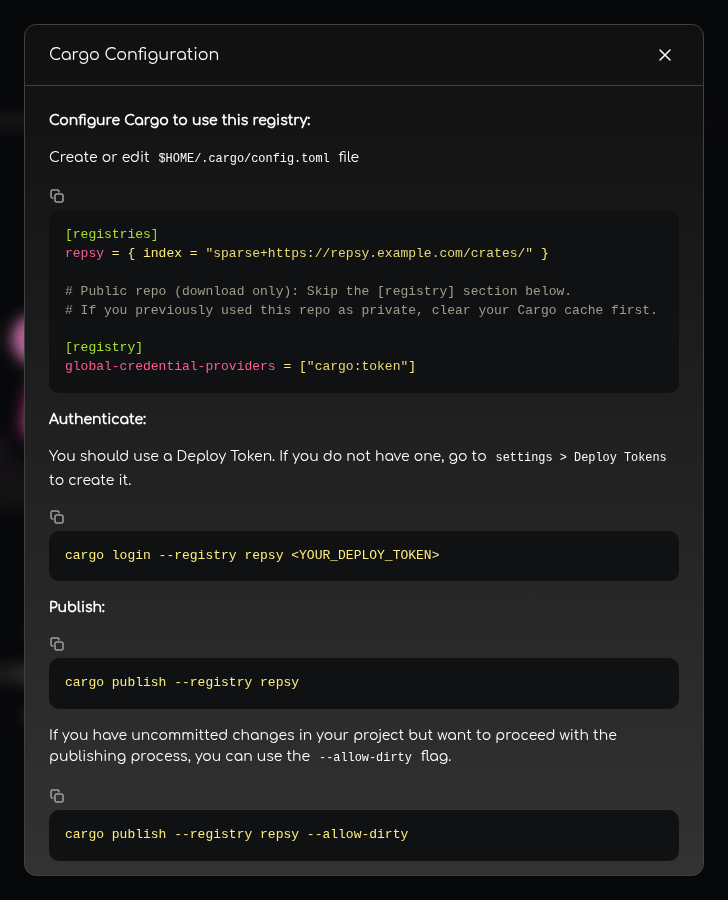
Tell Cargo about the registry
Cargo knows a registry by a name that you choose, and every command refers to it with --registry <registry-name>. The examples call it repsy. Add it to a Cargo configuration file. There are two places:
.cargo/config.tomlin your project (or in a parent directory of it). It applies to that project only and is safe to commit, because it holds no secret.$HOME/.cargo/config.toml. It applies to every project of your user.
[registries.repsy]
index = "sparse+https://<your-repsy-host>/<repo-name>/"

[registry]
global-credential-providers = ["cargo:token"]
The sparse+ prefix selects the sparse registry protocol, which Repsy serves. The closing slash is required: Cargo stops with sparse registry url must end in a slash without it.
The [registry] section lets Cargo send the token to a registry that asks for one, which a private repository does for every request. Without it, Cargo stops with authenticated registries require a credential-provider to be configured. A public repository does not need the section, and it does no harm there.
Sign in with the deploy token
Store the token for the registry:
cargo login --registry repsy
Cargo asks for the token: paste it and press Enter. Cargo saves it in $CARGO_HOME/credentials.toml, by default $HOME/.cargo/credentials.toml, in plain text and readable by your user only. The dialog of the web UI shows the older form cargo login --registry repsy <your-deploy-token>. It still works, but recent Cargo versions warn that a token on the command line is deprecated: it lands in your shell history.
A public repository can be read without a token, so you only need to sign in to publish to it. To give a token to one command without saving it, set the environment variable instead, see Cargo in CI.
Create a crate
Create a library crate:
cargo new --lib hello_repsy
cd hello_repsy
Add a .cargo/config.toml with the registry entry of the first step if you did not put it into your home directory. Then describe the crate in Cargo.toml:
[package]
name = "hello_repsy"
version = "0.1.0"
edition = "2021"
description = "A small example crate"
license = "MIT"
publish = ["repsy"]
The name and the version identify the release in Repsy. Cargo only warns when description and license are missing, but a description shows up in cargo search and in the web UI, so it is worth writing one.
publish = ["repsy"] limits where this crate may be published. Cargo then publishes to Repsy without --registry and refuses to publish the crate anywhere else, so an internal crate cannot reach crates.io by accident.
Publish the crate
Inside a Git repository, Cargo refuses to publish uncommitted changes, so commit the project, or add --allow-dirty:
git init && git add . && git commit -m "First version"
cargo publish --registry repsy
Cargo packages the crate, builds it once to check it, uploads it, and waits until the registry lists it:
    Updating `repsy` index
   Packaging hello_repsy v0.1.0 (/home/you/hello_repsy)
    Packaged 7 files, 1.5KiB (1.1KiB compressed)
   Verifying hello_repsy v0.1.0 (/home/you/hello_repsy)
   ...
   Uploading hello_repsy v0.1.0 (/home/you/hello_repsy)
    Uploaded hello_repsy v0.1.0 to registry `repsy`
note: waiting for hello_repsy v0.1.0 to be available at registry `repsy`.
You may press ctrl-c to skip waiting; the crate should be available shortly.
   Published hello_repsy v0.1.0 at registry `repsy`
cargo publish returns when the registry lists the crate, so you can use it right away.
Look at it in the web UI
Open the repository in the web UI. The crate is in the list, and you can search it. Click it to see its versions, and a version to see:
- the command to use the crate: Add Dependency,
cargo add <crate-name>@<version> --registry repsy, for a crate with a library, and Install Binary,cargo install <crate-name> --version <version> --registry repsy, for a crate that has only binaries; - the
.cargo/config.tomlentry for the registry and theCargo.tomlof the version, both with a copy button; - the metadata: the crate name, the number of downloads and the Rust version,
Not specifiedunlessrust-versionis set inCargo.toml; - the README of the crate, if it has one (set
readmeinCargo.toml).
A yanked version is marked, see Yanking and Un-yanking Crates.
Publish a new version
A version can be published only once. Change the version in Cargo.toml, commit, and run cargo publish --registry repsy again. All versions stay available and are listed together.
Publishing a Version Twice
If you publish a version that already exists, cargo refuses before it uploads anything:
error: crate [email protected] already exists on `repsy` index
A client that does not check first gets the answer of the server: status 400 and the body {"errors":[{"detail":"this crate version already exists in this registry"}]}. Either way, nothing is stored and the crate that is already there stays as it was.
Cargo repositories are immutable: the Package Override setting is not offered for them, and no setting lets a second publish replace a version. To change what a version contains, publish a new version. To take a version away from your users, yank it.
An administrator can delete a version in the web UI, which removes it with its file. After that its number is free again. Do not reuse it for different content: a project that already locked the old version in its Cargo.lock remembers the checksum of the old file.
Use the Crate as a Dependency
In another project, make sure the registry is configured and you are signed in (the first two steps above), then add the dependency:
cargo add hello_repsy --registry repsy
Or write it in Cargo.toml:
[dependencies]
hello_repsy = { version = "0.1.0", registry = "repsy" }
The registry key is required. A dependency without it is looked up in crates.io. A build of a crate that names the registry downloads the crate from Repsy:
cargo build
 Downloading crates ...
  Downloaded hello_repsy v0.1.0 (registry `repsy`)
   Compiling hello_repsy v0.1.0 (registry `repsy`)
Some things to know:
- Dependencies of your crate. Repsy stores the crates that you publish to it and does not fetch crates from other registries. A crate of yours may depend on crates.io crates and on crates from the same Repsy repository: Cargo records where each dependency comes from when you publish, and resolves each one from there. A dependency from your Repsy repository needs
registry = "repsy"in theCargo.tomlof the crate that uses it, also inside the crate you publish. - Several registries. Every registry has its own name,
[registries.<registry-name>], and its own token, so one project can use crates from several Repsy repositories. - A public repository can be used without signing in, and without the
[registry]section.
Install a Binary Crate
A crate with a main.rs builds an executable. Publish it like any crate, then install it with cargo install and name the registry:
cargo install hello-tool --registry repsy
Add --version <version> for a version other than the newest. Without --registry, cargo install looks in crates.io and reports could not find the crate there. The executable lands in $CARGO_HOME/bin, by default $HOME/.cargo/bin. Crate names may contain - and _.
Search and Owners
Search the repository for a crate:
cargo search hello --registry repsy
It lists the matching crates with their newest version and their description:
hello_repsy = "0.1.0" # A small example crate
cargo owner --list prints the name of the repository as the only owner, with the note Ownership is managed at the repository level in this registry:
cargo owner --list --registry repsy hello_repsy
Repsy has no owners per crate. Who may publish is decided by the repository: a Read/Write deploy token of the repository can publish and yank every crate in it. cargo owner --add and --remove do not change that.
Limits
Repsy refuses a .crate file larger than 100 MB with status 413. An administrator can change the limit with the CARGO_MAX_CRATE_SIZE variable, see the Configuration Reference. A reverse proxy in front of Repsy may have a smaller limit of its own.
Troubleshooting
| What you see | Cause and fix |
|---|---|
no token found for repsy, please run cargo login --registry repsy | Cargo has no token for the registry. Run cargo login --registry <registry-name>, or set CARGO_REGISTRIES_<registry-name>_TOKEN (registry name in upper case, - as _). The name is the one in [registries.<registry-name>], and the same as after --registry. A private repository needs the token for reading too. |
authenticated registries require a credential-provider to be configured | Add [registry] global-credential-providers = ["cargo:token"] to the configuration. |
failed to get successful HTTP response or failed to publish to registry with got 401 | The token is wrong, expired, revoked or rotated, belongs to another repository, or is Read Only and you publish or yank. The password of a user account is not accepted as a token. |
sparse registry url must end in a slash | The index address in the configuration has no closing /. |
no matching package named and location searched: crates.io index | The dependency has no registry = "<registry-name>", so Cargo asked crates.io. |
crate <crate-name>@<version> already exists on <registry-name> index | The version was published before. Publish a new version. |
version <version> is yanked | The version was yanked and Cargo may not pick it for a new resolution, see Yanking and Un-yanking Crates. |
| A new version is not found right after publishing, or the index seems stale | Cargo caches the index. Delete the cache of the registry, see Installing a Cargo Crate from Registry, and try again. |
413 while publishing | The .crate file is larger than the limit, see Limits. |

